
Add your team
Invite your manager and staff by mobile number or Gmail, choose what each can do, and control who sees amounts.
 Watch the video · 0:56opens on YouTube
Roles
- Owner: everything, including the team, team settings and deleting the diary.
- Admin: runs the business: venues, halls, prices and the team below admin.
- Manager: bookings, payments, refunds and cancellations; discounts up to the limit you set.
- Staff: bookings, blocks, meter readings and photos. No payments, and no amounts unless you allow it.
- View only: sees the diary and its amounts, changes nothing.
Invite someone
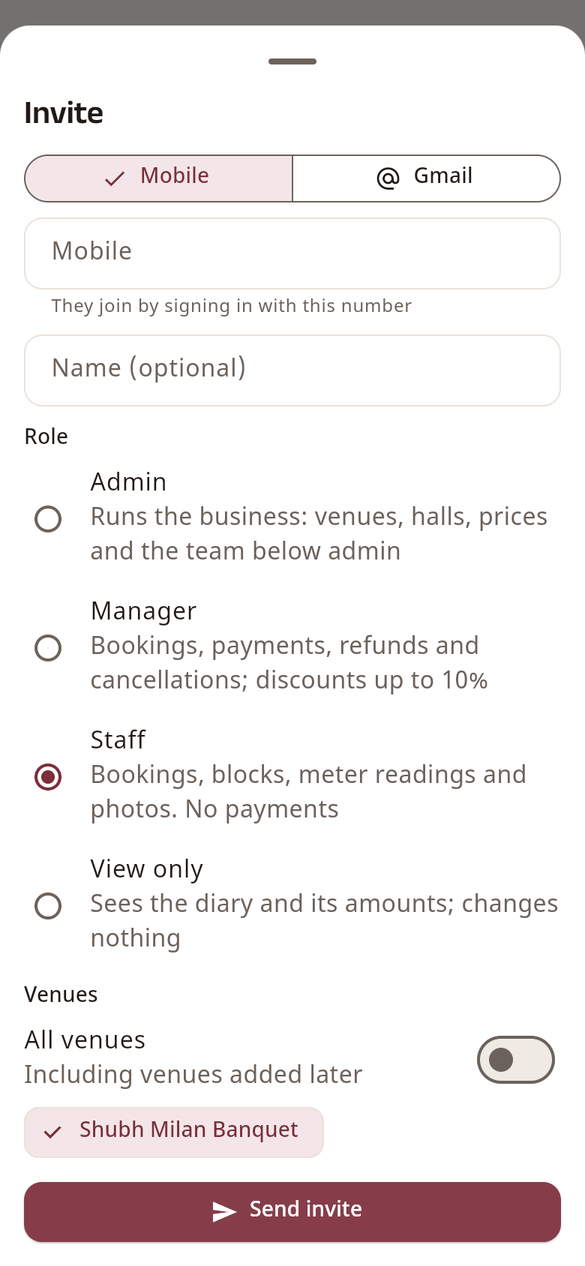
- Open Settings › Team and tap Invite.
- Choose Mobile or Gmail and type their number or Gmail address.
- Add their name if you like, pick the Role, and the venues they work at (All venues, or only some).
- Tap Send invite. WhatsApp or email opens with the invite; send it.
They join by signing in to HallDiary with that same number or Google account. An invite works for 14 days; until then it shows under Invited, where you can send it again or cancel it.
Change or remove someone
Tap the person in Team to change their role or venues, or Remove from team. They lose access at once. Admins can manage managers and below; only the owner manages admins.
Team settings (owner)
In Team › Team settings:
- Staff can see amounts: off by default, so staff see bookings without bills, payments or balances.
- Manager discount limit: how big a discount a manager may give, as a share of the bill total (10% unless you change it).
- Staff discount limit: off unless you set it; works only when staff can see amounts.
- Managers and staff may change: Room rates, Add-on prices and Other charges on a booking (all on unless you turn them off). Hall rent is changed only by you and admins.
- Proof of payments: make a proof file compulsory for refunds, or for payments above an amount.